If you have spent any time on the Dress to Impress runway lately, you have probably noticed a massive shift in the meta. Plain, single-piece gowns are out, and intricate, multi-layered masterpieces are in. At the very top of this trend is the Woven Fantasy Dress DTI aesthetic. Whether you are competing in a “Fantasy” category, a “Runway” theme, or just want to flex your styling skills in the VIP room, mastering the art of the woven gown is your ticket to five-star votes and viral screenshots.
But what exactly does “woven” mean in the context of DTI? It does not necessarily mean a single clothing item with a basket-weave texture. Instead, it refers to a highly advanced styling technique where players use layering, overlapping accessories, braid-like detailing, and intersecting fabric patterns to create the illusion of a complex, hand-woven garment. It is all about trick the eye into seeing craftsmanship, corsetry, and ethereal lattice work.
In this guide, we are going to break down everything you need to know to master this look. We will cover practical style tips, a step-by-step build tutorial, six ready-to-use outfit concepts, and community styling secrets. By the end of this article, you will have the tools to build a Dress to Impress woven dress that leaves the other competitors staring at your avatar in pure awe. Let’s get into the wardrobe and start weaving!
What is a Woven Fantasy Dress in DTI?
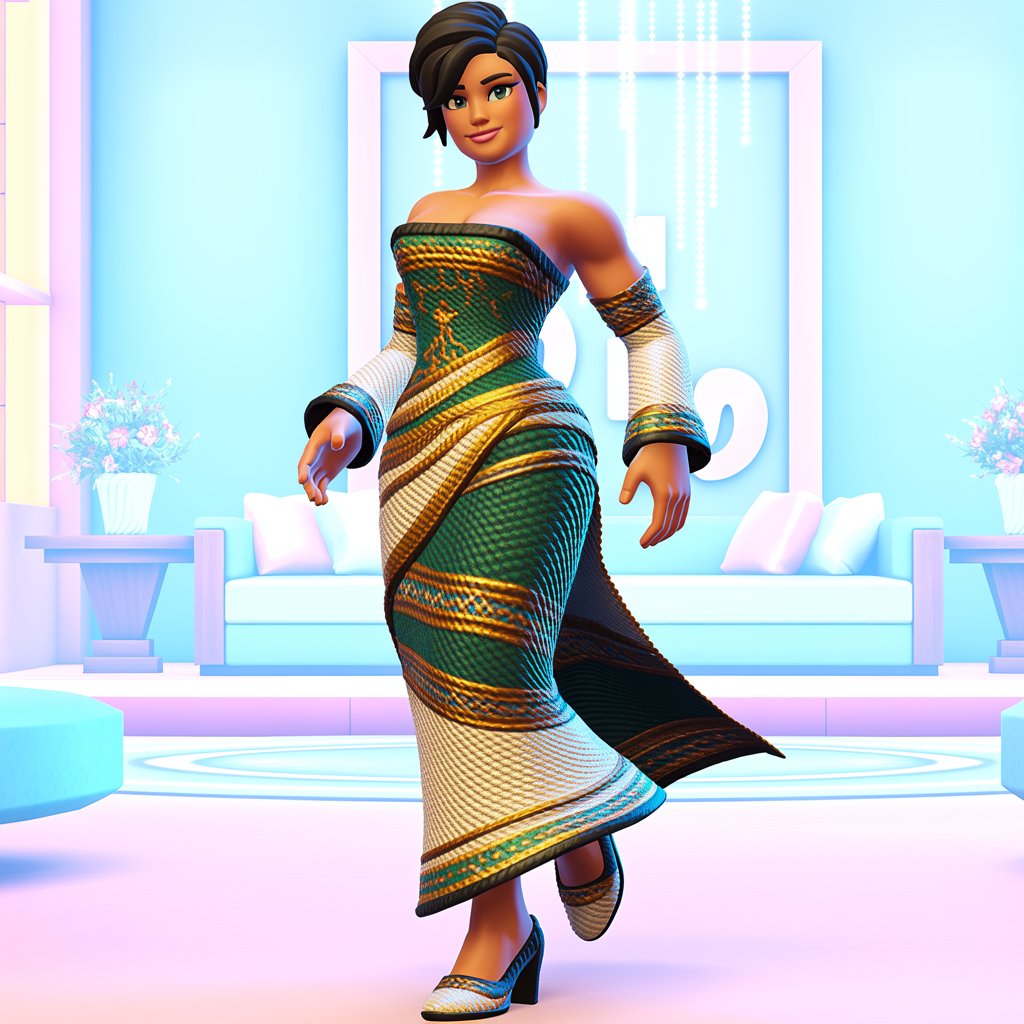
A Roblox DTI woven fantasy look is defined by fantasy-inspired silhouettes that feature braided motifs, ethereal fabrics, flowing trains, and nature-infused or fairytale influences. Think of the intricate corsetry of an elven queen, the vine-wrapped bodices of forest nymphs, or the metallic lattice-work of a celestial goddess. The core of this style is visual complexity. It looks like it took hours to craft, even if you put it together in the dressing room in under five minutes.
Because DTI does not have a native “weave” tool, players achieve this look by cleverly combining available Roblox assets. You are essentially acting as a digital tailor. By utilizing front and back overlays, waist chains, layered skirts, and even repurposed hair accessories, you can create intersecting lines that mimic a woven texture. For example, crossing multiple thin belts over a corset top instantly creates a lattice effect.
The color palettes for these gowns usually lean into rich, evocative tones. You will see a lot of pastel fairy-core, deep jewel tones for royal themes, and metallic accents (gold, silver, rose gold) to highlight the “threads” of the weave. Floral and vine patterns are also incredibly common, acting as the “loom” that holds the dress together.
When you look at a top-tier woven gown, it usually evokes three distinct visual descriptors:
- Moonlit silk: Flowing, semi-transparent overlays that catch the in-game lighting like spun silver.
- Emerald woven bodice: Tight, intersecting dark green straps or vines that cinch the waist and provide structural contrast.
- Petal-layered hem: A skirt base that uses overlapping, asymmetrical overlays to look like woven leaves or flower petals.
Why the Woven Fantasy Dress Works in DTI
You might be wondering: Why put in all this effort when a pretty dress from the featured section usually does the trick? The answer comes down to how DTI gameplay and avatar aesthetics actually work. A woven fantasy dress instantly elevates your avatar from “cute” to “couture.”
First, it stands out in competitions. When the runway lights hit and your avatar walks out, the visual complexity of a woven build draws the eye immediately. It photographs beautifully in-game because the intersecting layers create natural shadows and highlights, giving your avatar a 3D depth that flat textures simply cannot match. Furthermore, it perfectly matches fantasy roleplay themes, which are incredibly popular in community-run DTI servers and TikTok videos.
The appeal also lies in its versatility. A well-built woven gown can easily pivot between categories. Add a crown and it is “Royalty.” Add wings and it is “Fantasy.” Strip the accessories back and it is “Elegant” or “Runway.”
Consider a typical judging scenario: Player A submits a beautiful, but plain, A-line pink gown. Player B submits a Woven Fantasy Dress DTI build featuring a pink base, crossed pearlescent ribbons, a braided waist belt, and a vine-draped train. Even if both fit the theme, judges (and random runway voters) will almost always give the edge to Player B. Why? Because voters value originality, cohesion, and a striking silhouette. The woven dress proves you understand how to manipulate the game’s assets to create something entirely new.
Step-by-step DTI Build Tutorial: Create a Woven Fantasy Dress
Ready to build? This DTI gown tutorial will walk you through the exact process of creating a woven masterpiece in the outfit editor. Grab your Robux, open the Wardrobe, and follow these steps.
Step 1: Choose Your Canvas (Body & Base)
Start by selecting your body type. The classic slim or curvy avatars work best for woven dresses because they provide a predictable hitbox for layering. Next, pick a base dress or a top-and-skirt combo. A simple, solid-color slip dress or a tight corset top with a plain A-line skirt is perfect. Avoid bases with heavy pre-existing patterns, as they will clash with your woven overlays.
Step 2: Establish the “Loom” (The Skirt & Train)
The skirt is the foundation of your weave.
- Go to the
SkirtsorDressestab and select a flowing, asymmetrical, or high-low hemline. - Add a back train attachment (found in the
AccessoriesorBacktabs). - Pro Tip: Use a slightly darker shade for the base skirt than your intended overlays. This creates depth, making the “woven” pieces pop off the screen.
Step 3: Create the Weave (Overlays & Intersections)
This is where the magic happens. To mimic a woven texture, you need to create intersecting lines across the bodice and waist.
- Belts & Chains: Equip 2 to 3 thin belts or waist chains. Tilt them slightly (if the game allows adjustment) or choose asymmetrical belts that cross over the hips.
- Necklaces as Bodices: Equip long, layered necklaces or chest harnesses. Let them drape over the corset to look like woven metallic threads.
- Arm Wraps & Sleeves: Use detached sleeves or arm bands that feature crisscross ribbon details to carry the woven theme down the arms.
Step 4: Color-Matching and Textures
A woven dress falls flat if the colors are muddy. Pick a main color, a darker shade for depth, and a lighter metallic for highlights.
/* Example Woven Fantasy Color Palette */
:root {
  --base-emerald: #0B3B24;
  --vine-highlight: #2E8B57;
  --gold-thread: #D4AF37;
  --silk-overlay: rgba(255, 255, 255, 0.6);
}
Use the in-game color sliders to match your overlays to these exact tones. Use metallics sparingly—only on the “threads” (belts, chains, jewelry) to simulate the shine of woven gold or silver wire.
Step 5: Animation and Pose Testing
Before you finalize, test your emotes! Some bulky back pieces or layered skirts will clip through your arms during the Runway Walk or specific poses. If an overlay clips terribly, swap it for a thinner alternative. You want your dress to look flawless in motion, not just standing still.
📋 Click here for your Pre-Submission Checklist!
- [ ] Silhouette Check: Does the dress have a clear shape, or is it a blob of layers?
- [ ] Clipping Check: Run through 3 different poses. Are there any glaring overlaps?
- [ ] Color Harmony: Are there no more than 3 main colors in the outfit?
- [ ] Theme Alignment: Does the outfit clearly fit the current runway theme?
- [ ] Face & Hair: Do the makeup and hair complement the dress without overpowering it?
6 Ready-to-Use Outfit Ideas
Need some DTI outfit ideas woven into your next runway look? Here are six distinct concepts you can build today, complete with judge-pleasing tips.
- Moonlit Weaver
- Concept: A silver-blue slip dress with a flowing, semi-transparent train. Use pearl-strand necklaces layered across the chest and thin silver chain belts to create the “woven” moonbeam effect.
- Judge Tip: Perfect for “Celestial” or “Ethereal” themes. Keep the makeup soft and glowing to maximize the moonlit vibe.
- Forest Sylph
- Concept: An emerald green base with vine overlays wrapping around the waist and shoulders. Add a leafy crown and use braided hair accessories draped over the shoulders to mimic a woven bark bodice.
- Judge Tip: Ideal for “Nature” or “Fairycore.” Use barefoot or sandal accessories to ground the look in nature.
- Ember Lace Gown
- Concept: Deep crimson base with a braided, corset-style top. Use gold trim overlays and crossed red ribbons on the arms. The “weave” here looks like glowing embers trapped in a golden net.
- Judge Tip: Slay the “Villain” or “Royalty” categories with this one. Pair with a sharp, winged eyeliner and a dramatic updo.
- Midnight Court
- Concept: Black and amethyst purple. Use a lattice-style bodice overlay, dramatic detached sleeves, and a dark, starry back train. Cross thin purple velvet belts over a black skirt.
- Judge Tip: A guaranteed winner for “Goth” or “Dark Fantasy.” The high contrast between the black base and purple weave reads beautifully from the audience’s camera distance.
- Celestial Tapestry
- Concept: A pastel ombré dress (pink fading into blue) featuring star motifs. Use iridescent, shiny overlays and crisscrossing pearl harnesses to look like a woven tapestry of the night sky.
- Judge Tip: Best for “Angelic” or “Dream” themes. The ombré effect shows high-level color-matching skills, which voters love.
- Ocean Loom
- Concept: Teal and aquamarine gradients. Use shell accessories, braided waist cords (rope belts), and net-like lace overlays on the skirt to mimic a fisherman’s net or woven kelp.
- Judge Tip: Perfect for “Mermaid” or “Beach” themes. Keep the hair wet-look or flowing to sell the underwater illusion.
Styling Extras & Photoshoot Tips
A Woven Fantasy Dress DTI build is only half the battle; how you present it is the other half. To truly sell the fantasy, your styling extras need to match the intricacy of the gown.
- Hairstyles: Avoid massive, blocky hair that hides your woven bodice. Opt for elegant updos, intricate braids (which echo the woven theme), or long, sleek hair parted to one side.
- Makeup: Use the
Makeuptab to add subtle facial jewels, glowing eyeshadow, or intricate eyeliner. If your dress is heavily woven, keep the lips neutral so the face doesn’t compete with the outfit. - Props & Accessories: Handheld props like glowing orbs, ornate fans, or floral staffs add to the fantasy lore. Wings should be chosen carefully—translucent or wire-frame wings complement woven dresses much better than solid, feathery ones.
Photoshoot Tips for In-Game Screenshots:
When taking screenshots for TikTok or Instagram, camera angle is everything. Position your camera slightly below the avatar’s waist and angle it upward. This elongates the legs and shows off the full drape of the woven train. For lighting, the in-game “Sunset” or “Night” lighting options provide dramatic shadows that highlight the intersecting layers of your weave.
Best Roblox Background Scenes: enchanted forests, grand ballrooms, moonlit cliffs, or coastal ruins. If you are using a green screen, search for “fantasy ruins concept art” to use as your backdrop!
Community Resources & Inspiration
You do not have to invent every woven concept from scratch. The DTI community is massive, and sharing inspiration is a huge part of the culture.
- Where to Look: Browse the Roblox catalog using tags like “lace overlay,” “harness,” and “vine.” Join the official [Insert External Link: DTI Community Discord Server] to see daily outfit challenges and get real-time feedback from veteran players.
- Social Media: Search TikTok, Instagram, and Pinterest using hashtags like
#DTI,#DressToImpress, and#WovenDress. You will find thousands of short-form videos showing the exact layering orders used by top creators. - Etiquette: It is perfectly fine to be inspired by another player’s build! However, if you are posting a direct replica of a famous creator’s outfit on social media, it is good etiquette to tag them or credit their original design. For more styling guides, check out our archive: [Insert Internal Link: Best DTI Fantasy Themes & Tutorials].
Troubleshooting & Common Mistakes
Even the best stylists run into glitches. Here is a breakdown of common woven dress mistakes and how to fix them quickly.
🛠️ Troubleshooting Guide
| Common Mistake | Why It Happens | Quick Fix |
|---|---|---|
| Over-layering / Clipping | Too many 3D overlays fighting for the same physical space on the avatar hitbox. | Reduce overlays. Rely on 2D texture overlays (like lace or tattoos) instead of 3D belts. |
| Muddy / Mismatched Colors | Using the color wheel randomly without a set palette. | Use a palette tool (like Coolors.co) and stick to a strict 3-color rule (Base, Shadow, Highlight). |
| Busy / Chaotic Patterns | The “weave” is too thick, hiding the base dress entirely. | Simplify. Space out your belts/chains. Aim for a visual weight ratio of roughly $1:1.618$ (the golden ratio) between your bodice and skirt. |
| Wrong Proportions | The skirt is too short, making the heavy woven bodice look top-heavy. | Adjust the skirt length or add a back train to balance the visual weight of the corset. |
| Hidden Details | Heavy necklaces or massive hair completely covering the woven chest piece. | Scale down accessories. Move hair to the back or use a sleek updo to frame the bodice. |
Remember: Iteration beats perfection. If a build looks clunky, strip it back to the base and add layers one by one. Test, tweak, and repeat!
Closing
The runway is calling, and you are now fully equipped to dominate it. The Woven Fantasy Dress DTI aesthetic is all about creativity, patience, and learning how to push the Roblox avatar editor to its absolute limits. By mastering layers, playing with color depth, and utilizing clever accessories, you can turn basic catalog items into high-fashion fantasy couture.
Now it is your turn! Try out the step-by-step tutorial, build one of the six outfit concepts, and strut your stuff on the runway. Tag your finished designs with the hashtag #WovenDTI on TikTok, Instagram, or in the community Discord so we can review, hype you up, and potentially feature your standout entries in our next community roundup post!
Have a specific DTI styling question or want to share a link to your latest woven masterpiece? Drop a comment below—we can’t wait to see what you create!