Step Onto the Glittering Floor
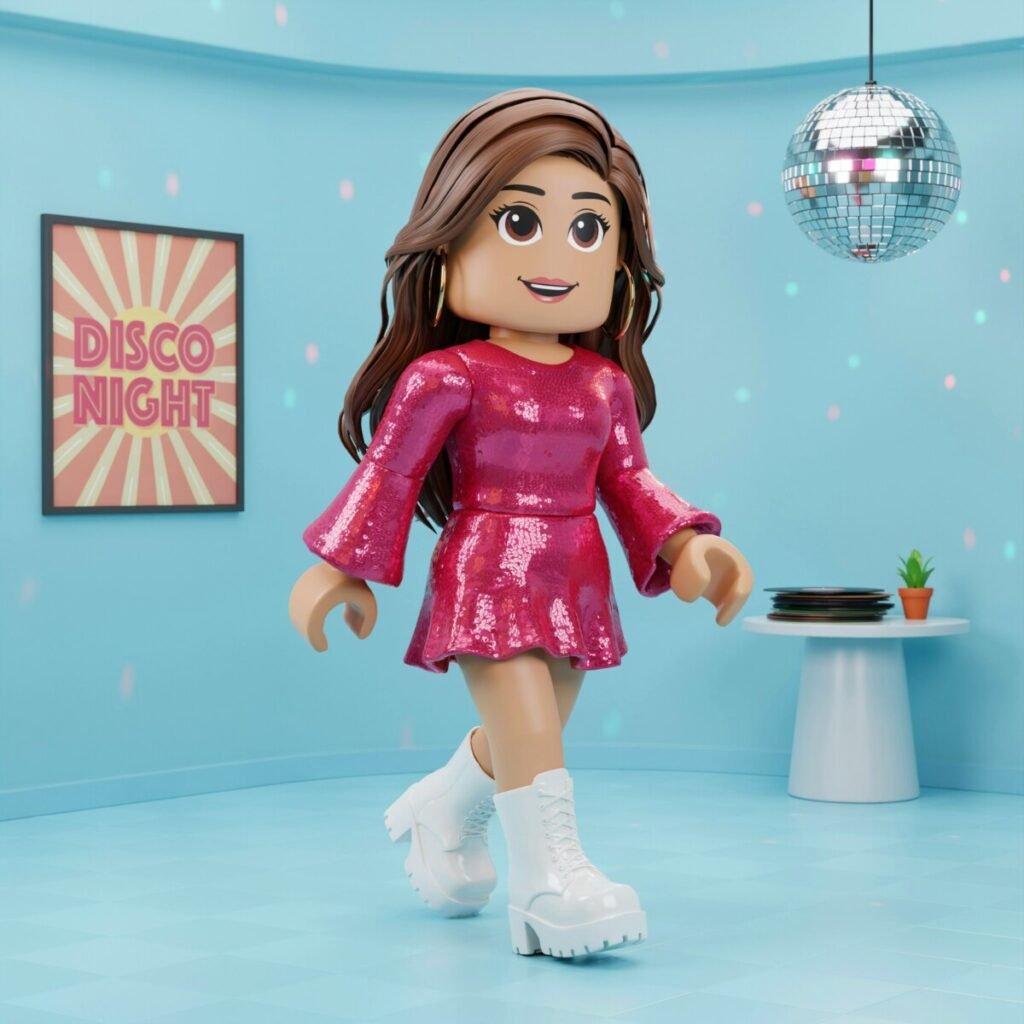
Picture this: a mirrored disco ball spins overhead, scattering a thousand pinpricks of light across a checkered Roblox dance floor. Neon magenta and electric blue wash the walls. Platform shoes—thick, gleaming, impossible platform shoes—stomp in rhythm while sequined jumpsuits catch every photon like tiny disco supernovas. You spin, your bell-bottoms flare in a perfect arc, and the screenshot you just snapped? Absolute fire.
That’s the magic of a 1970s Disco Dress to Impress theme. It’s bold, it’s nostalgic, it’s unapologetically extra—and it translates beautifully into Roblox DTI. Whether you’re a player hunting for that perfect themed-round win, a content creator building a lookbook series, or a YouTuber scripting your next “DTI outfit ideas” video, disco gives you dramatic silhouettes, saturated color palettes, and thumbnail-ready sparkle that pops on any screen.
In this guide, we’ll walk through real-world 70s fashion context, translate it into actionable Roblox DTI styling steps, build three complete outfits from scratch, and finish with posing and photography tricks so your Roblox DTI disco outfit looks as good in a thumbnail as it does in-game. Let’s groove.
The 1970s Disco Fashion Cheat Sheet
Before you open the DTI outfit editor, it helps to know what made disco fashion disco fashion. The era (roughly 1973–1979, peaking around 1977–78) was all about movement, shine, and volume.
Iconic silhouettes and pieces:
- Jumpsuits — one-piece, often halter-neck or wide-collar, in satin or sequin-covered fabric.
- Bell-bottoms and wide-leg pants — the wider the flare, the better.
- Platform shoes — three-to-five-inch soles for both men and women.
- Wide, exaggerated collars — think John Travolta in Saturday Night Fever.
- Sequins, lamé, and metallic fabrics — gold, silver, copper, anything that catches light.
- Bold prints — psychedelic swirls, geometric patterns, animal prints in unnatural colors.
The disco color palette:
Gold and silver metallics anchor everything. Jewel tones—emerald green, ruby red, sapphire blue—add richness. Warm oranges, burnt sienna, and chocolate brown ground the retro feel. Hot pink and electric purple bring the nightlife energy.
Accessories: Oversized sunglasses (aviators or round Lennon-style), thick gold chain necklaces, hoop earrings the size of coasters, wide metallic belts, and headbands or scarves tied around voluminous hair.
A quick history note: Disco culture grew out of Black, Latino, and LGBTQ+ underground dance clubs in New York and Philadelphia before exploding mainstream. The fashion was intentionally flamboyant—a celebration of visibility and joy on the dance floor.
Translating Disco to Roblox Dress to Impress
Here’s where it gets practical. DTI gives you a layered outfit editor: hair, face/makeup, top, bottom, shoes, and multiple accessory slots. You can’t drape real lamé fabric, but you can fake it convincingly.
Working within DTI’s system:
- Layering is your best friend. Stack a metallic belt over a solid-color top to simulate a cinched jumpsuit waist. Add a chain necklace and hoop earrings to fill the accessory slots without clutter.
- Color overlays and UGC items. Many user-generated content (UGC) creators in the Roblox catalog offer sequin-textured tops, metallic pants, and platform boots that don’t exist in the default set. Search “sequin,” “metallic,” “disco,” or “70s” in the catalog. Mix one or two UGC hero pieces with default items to keep the look cohesive.
- Silhouette over texture. At Roblox’s pixel scale, a strong silhouette reads faster than fine texture. Prioritize the shape—wide pants, big hair, chunky shoes—then add sparkle details as accents.
- Thumbnail readability. When your avatar is small on screen, a gold top + black bell-bottoms + white platforms reads instantly. Save the subtle crushed-velvet texture for close-up screenshots.
Pro tip: If you can’t find a true jumpsuit item, fake it. Pair a fitted metallic top with matching-color wide-leg pants, then add a thin belt at the waist. From a distance, it reads as one continuous piece.
Three Step-by-Step Outfit Builds
Outfit 1: “Studio 54 Icon”
- Hair: Big feathered blonde or auburn volume (search “70s feathered hair” or “disco volume hair” in UGC).
- Top: Gold sequin halter top (UGC) or a metallic gold fitted tank from the default catalog.
- Bottoms: Black high-waisted bell-bottoms with a slight flare.
- Shoes: Gold platform heels (3–4 inch sole).
- Accessories: Thin gold chain necklace, oversized round sunglasses pushed up on the head, small gold hoop earrings.
- Color/texture notes: Metallic gold against matte black creates maximum contrast. The sequin texture on the top catches in-game lighting.
- Styling tip: Tuck the top visually by choosing a cropped cut; add a thin metallic belt if the waistline looks loose.
- Pose & venue: Use a spinning emote under a disco-ball-lit venue. Angle the camera low to emphasize the platforms.
Outfit 2: “Groovy Jumpsuit Queen”
- Hair: Sleek center-parted long black hair with a headband (wide, metallic silver).
- Top + Bottom (faked jumpsuit): Emerald-green satin wide-collar shirt + matching emerald wide-leg pants. Add a silver metallic belt to unify.
- Shoes: White chunky platform boots.
- Accessories: Large silver hoop earrings, a single layered chain necklace, aviator sunglasses.
- Color/texture notes: Jewel-tone green reads as luxurious; the silver accessories add disco sparkle without competing.
- Styling tip: Keep the collar wide—it frames the face and screams 1977. If the shirt’s collar is modest, layer a UGC “wide collar” accessory over it.
- Pose & venue: Hands-on-hips power pose, slight hip tilt. Background: a retro lounge with orange and brown geometric wallpaper.
Outfit 3: “Funky Disco Duo” (for paired/group screenshots)
- Player A: Hot-pink psychedelic-print wide-collar shirt, white bell-bottoms, silver platforms, round purple sunglasses, gold chain.
- Player B: Silver lamé tank top, black flared pants, gold platforms, mirrored aviators, layered gold necklaces.
- Shared notes: Complementary metallics (silver + gold) tie the pair together. Both silhouettes are loud but balanced—one print, one solid.
- Pose & venue: Back-to-back pose or mid-dance spin facing each other. Venue: neon-lit dance floor with a giant disco ball overhead.
Hair, Makeup, and Accessory Details
Disco hair is big. Think Farrah Fawcett feathered layers, voluminous afros, or sleek center parts with face-framing wings. In DTI, search for “voluminous,” “feathered,” “70s blowout,” or “disco hair” in the UGC catalog. If your chosen hair lacks volume, add a headband or scarf accessory to create the illusion of height.
Makeup (face cosmetics in DTI):
- Smoky eyes with metallic gold or silver shadow.
- Glossy, warm-toned lips (coral, brick red, or shimmery nude).
- Defined brows—bold and slightly arched.
- Optional: a beauty mark or subtle blush for warmth.
Accessories that catch light:
- Chains: A thick gold chain sits at the collarbone and reflects in-game point lights beautifully.
- Hoop earrings: Go large. They frame the face and add movement in spinning emotes.
- Mirrored sunglasses: Even pushed up on the head, they add a reflective accent that pops in screenshots.
- Metallic belts: Cinch the waist and break up a monochrome outfit.
Place your shiniest accessory (chain or sunglasses) where the in-game light source hits—usually upper-left or directly overhead near a disco ball.
Posing, Photography, and Thumbnail Tips
Capturing disco energy in screenshots:
- Use motion emotes (spin, dance, strut) and capture mid-frame for a sense of movement. A slight blur on the bell-bottom flare sells the groove.
- Low camera angles exaggerate platform shoes and make the avatar look powerful.
- Group shots under a disco ball with 3–5 avatars in complementary palettes create dynamic compositions.
- Frame the shot so the pants flare and shoe sole are visible—those are your “disco identifiers” at a glance.
Lighting and post-editing:
- In Roblox, position your avatar near point lights or under the disco-ball object for natural sparkle on metallic items.
- In post (phone editor, Canva, or Lightroom mobile): bump contrast +10–15, saturation +10, and add a soft glow/bloom effect to sell metallics. A subtle vignette keeps focus on the outfit.
Thumbnail composition:
- Bold color contrast: gold outfit against a deep purple or black background.
- Include a close-up inset of one detail (sequin texture, platform sole, or chain).
- Text overlay: “70s DISCO DTI” in a retro font (think Cooper Black or a groovy serif).
- Ideal size: 1280 × 720 px for YouTube, 1080 × 1350 px for Instagram/Pinterest.
For Creators: Content Ideas and Cross-Promotion
If you’re building content around your Dress to Impress 1970s look, here’s a quick idea bank:
- “How I Built This Disco Look” — a 60-second TikTok/Reel showing the DTI editor step-by-step.
- DTI Lookbook series — “5 Roblox Disco Style Outfits Under 2 Minutes.”
- Before/After color edit — show the raw screenshot vs. the glow-boosted thumbnail.
- Themed roleplay night — invite followers to a disco venue in Roblox; capture group content.
- Downloadable palette pack — share hex codes (gold #D4AF37, emerald #50C878, hot pink #FF69B4) as a freebie for followers.
Cross-posting strategy:
- TikTok: Transition video—casual avatar snaps fingers → full disco look. Hook: “POV: it’s 1977 and you’re entering Studio 54… in Roblox.”
- YouTube: SEO title like “Roblox DTI: 1970s Disco Outfit Guide + Posing Tips for Perfect Screenshots.”
- Pinterest: Vertical pin with the outfit + a palette swatch strip.
- Instagram Reels: 15-second spin showcase with a Donna Summer audio clip.
Shopping Checklist & Quick Item Cheat-Sheet
Grab these item types from the Roblox catalog or UGC stores before your next DTI disco round:
- ✅ Gold or silver sequin/metallic top (halter, tank, or wide-collar)
- ✅ Bell-bottom or wide-leg pants (black, white, or jewel tone)
- ✅ Platform shoes or boots (3″+ sole, metallic or white)
- ✅ Mirrored or oversized round sunglasses
- ✅ Thick chain necklace (gold or silver)
- ✅ Large hoop earrings
- ✅ Metallic belt (thin or wide)
- ✅ Voluminous 70s hair (feathered, afro, or sleek center-part)
- ✅ Headband or scarf accessory
- ✅ Color swatches to keep handy: Gold #D4AF37 · Silver #C0C0C0 · Emerald #50C878 · Hot Pink #FF69B4 · Burnt Orange #CC5500
Mini-Tutorial: Faking Sequin Shine in 4 Steps
- Base layer: Choose a solid metallic-color top (gold or silver) from the catalog.
- Texture overlay: Add a UGC “sequin” or “sparkle” accessory/shirt layer on top at reduced opacity if the editor allows, or pick a UGC item with baked-in sequin texture.
- Lighting positioning: Stand your avatar directly under a point light or disco-ball object so the metallic surface reflects.
- Post-edit glow: In your screenshot editor, add a soft outer glow (radius 8–12 px, warm gold tint) around the torso area to simulate light bouncing off sequins.
Now Hit the Dance Floor
You’ve got the palette, the builds, the posing angles, and the thumbnail tricks. Now it’s your turn to strut into that next DTI round and own the 1970s Disco Dress to Impress theme like you’ve got a VIP pass to Studio 54.
Try one of the three outfits above, snap your best spin-frame, and tag us on socials—we’d love to feature your Roblox DTI disco outfit in our next community roundup. And if you want more themed styling guides—80s neon, Y2K, old Hollywood—hit subscribe and follow so you never miss a DTI outfit ideas drop.
The disco ball’s spinning. The platforms are polished. Go get that W. 🪩✨
Deliverable: Social Media Caption
“POV: It’s 1977, the bass is thumping, and your Roblox avatar just walked into Studio 54 in a gold sequin jumpsuit and 5-inch platforms. 🪩✨ Built this full 70s disco look in Dress to Impress—bell-bottoms, wide collar, mirrored shades, the WORKS. Swipe for the step-by-step build + my favorite posing angles for thumbnails. Which disco era are you channeling? Drop a 🕺 or 💃 below. #RobloxDTI #DressToImpress #70sDisco #RobloxOutfit #DTIStyle”
Deliverable: 6-Item Blog Sidebar Checklist
“Disco Ready?” — Pre-Game Checklist
- ☐ Metallic or sequin top selected (gold, silver, or jewel tone)
- ☐ Bell-bottoms or wide-leg pants equipped with visible flare
- ☐ Platform shoes on (minimum 3-inch sole for silhouette)
- ☐ At least two reflective accessories (chain + hoops or sunglasses)
- ☐ Voluminous 70s hair with headband or scarf accent
- ☐ Disco-ball venue chosen + camera angle set to low for the hero shot