Kawaii style in Roblox Dress to Impress is all about soft colors, playful proportions, and tiny details that make an outfit feel delightfully sweet. Whether you’re aiming to charm judges or build a pastel avatar for your next roleplay, this guide will walk you through simple starter kits, pro-level customization tricks, and themed looks you can recreate in minutes. Ready to go full pastel and win hearts (and points)? Let’s build your first Kawaii ensemble step-by-step.
If you have been playing Dress to Impress (DTI) lately, you already know that the runway is fiercely competitive. Every week, new themes drop, and players scramble to find the perfect combination of clothing, hair, and accessories to secure those coveted 5-star votes. Among the most consistently popular and visually stunning aesthetics in the game is the Kawaii Dress to Impress style. Rooted in Japanese street fashion and characterized by hyper-feminine, cute, and whimsical elements, mastering a Roblox DTI kawaii look is a surefire way to stand out on the runway, dominate the leaderboards, and express your unique virtual style.
In this comprehensive DTI kawaii guide, we are going to dive deep into the pastel aesthetic. We will explore where to find the best items, how to layer them without messy clipping, and how to adapt the kawaii style to fit almost any DTI theme Lana throws your way. Grab your styling wand, and let’s get into the ultimate kawaii Roblox outfit ideas handbook!
What is Kawaii in DTI?
Before we start dragging and dropping items from the catalog, it helps to understand what “Kawaii” actually means in the context of Roblox fashion. Originating from Japanese culture, “kawaii” translates directly to “cute,” but in fashion, it represents a massive subculture encompassing everything from Harajuku street style and Lolita fashion to the hyper-sweet, character-driven aesthetics of brands like Sanrio.
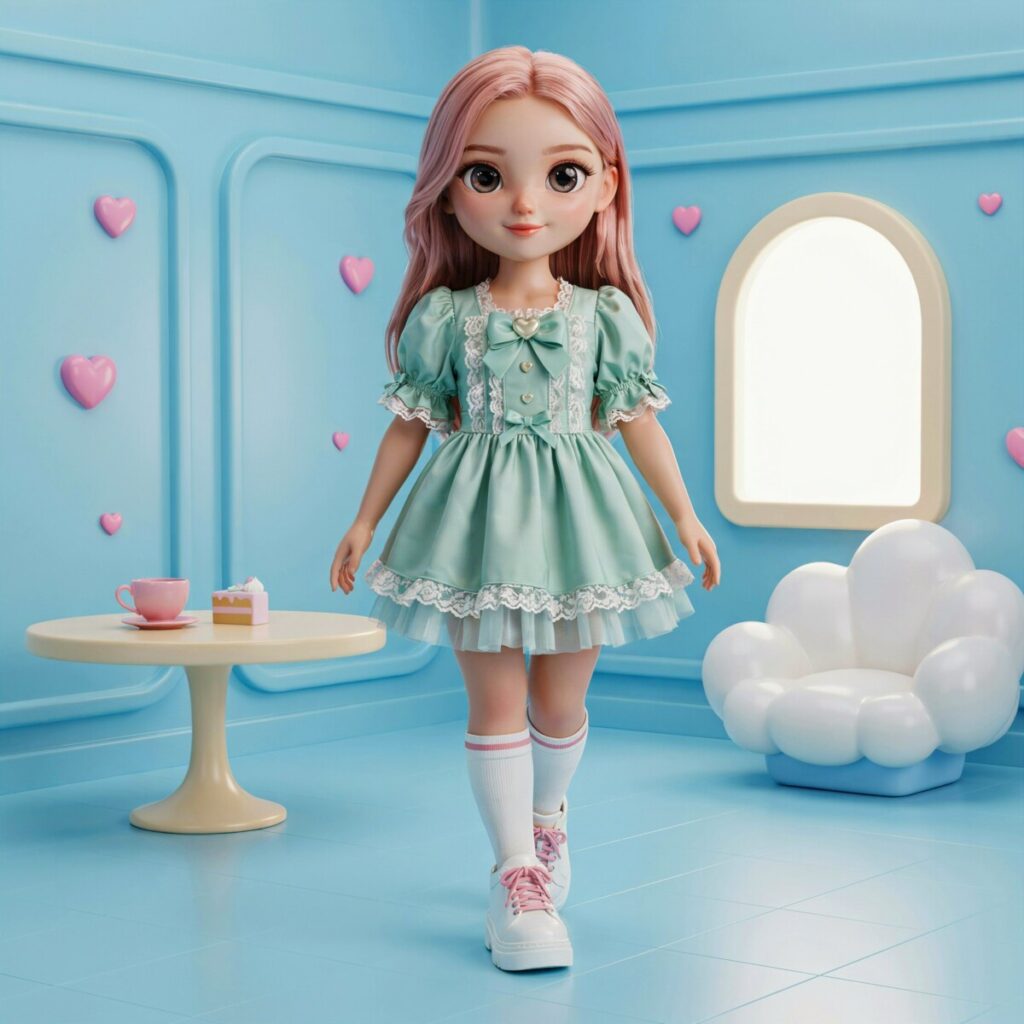
In Roblox DTI, a kawaii aesthetic translates into an avatar that looks soft, approachable, and meticulously styled. It relies heavily on specific visual cues: oversized accessories (like giant bows or plushie backpacks), doll-like facial features, pastel color palettes, and silhouettes that play with proportions—think massive, fluffy skirts paired with tiny, delicate tops.
Because Roblox relies heavily on its User-Generated Content (UGC) catalog, the Dress to Impress kawaii outfit meta has exploded. Talented 3D modelers and clothing designers have created thousands of items specifically tailored to this aesthetic, from mesh hairs with blunt, anime-style bangs to 3D ruffled skirts that move dynamically when your avatar walks down the runway. Translating this real-world fashion movement into a blocky, virtual space requires an eye for detail and a solid understanding of how Roblox’s avatar engine handles layers and textures.
Kawaii Basics: Palette, Silhouettes, and Textures
To build a winning pastel Roblox outfit, you need to master the foundational elements of the kawaii aesthetic: color, shape, and feel. If you just throw random pink items onto your avatar, you risk looking chaotic rather than cohesive. Here is how to master the basics.
The Color Palette
Kawaii fashion lives and dies by its color palette. The undisputed queens of this aesthetic are pastels: baby pink, lavender, mint green, butter yellow, and periwinkle blue. However, you can also incorporate “sweet” neutrals like cream, soft white, and light denim. A good rule of thumb for DTI is the 60-30-10 rule: choose one dominant pastel color for 60% of your outfit (like a large skirt and cardigan), a secondary color for 30% (like your hair and socks), and an accent color for 10% (like a bright cherry-red bow or a gold charm).
Silhouettes and Proportions
Kawaii silhouettes often play with extremes. You will frequently see “top-heavy” or “bottom-heavy” looks. A classic example is the “A-line” or “bell” shape created by a massive, petticoat-fluffed skirt paired with a tight, cropped sweater. Alternatively, the “oversized” streetwear look features giant, baggy hoodies that swallow the avatar’s hands, paired with tiny shorts and thigh-high socks. Playing with these proportions makes your avatar look intentionally styled rather than randomly generated.
Textures
Since judges in DTI can zoom in on your avatar, texture matters. Look for Roblox UGC kawaii items that feature ruffles, lace, soft knits, faux fur, and tulle. Mixing textures adds depth to your outfit. Pair a chunky, knitted pastel sweater with a smooth, shiny pleated skirt, and finish it off with soft, fuzzy leg warmers. This visual contrast is exactly what high-level DTI judges look for when deciding whether to award you a 5-star rating.
Starter Kawaii Kit
If you are new to Dress to Impress or just want to build a reliable Dress to Impress kawaii outfit without spending thousands of Robux, you need a versatile starter kit. These are the foundational items you should search for in the Avatar Shop and UGC catalog. Look for these specific item types to build your base:
- The Hair: Search for “pastel twin tails,” “blunt bangs bob,” or “space buns.” Hair with built-in accessories (like small ribbons or star clips) saves you an accessory slot. Stick to cotton-candy pink or soft lavender.
- The Face: The face is the centerpiece of any kawaii look. Look for mesh faces or high-quality decals featuring “starry eyes,” “heavy blush,” and a “small cat mouth” or “tiny pout.” Avoid hyper-realistic faces; you want a slightly stylized, anime-inspired look.
- The Top: An oversized pastel hoodie, a ruffled Peter Pan collar blouse, or a soft cardigan with bear ears on the hood. These items instantly establish the cute vibe.
- The Bottom: A pleated tennis skirt, a puffy tulle tutu, or high-waisted pastel shorts. If the DTI theme allows, puffy bloomers are a fantastic, underrated choice for a vintage-kawaii look.
- The Shoes: Chunky platform Mary Janes, pastel sneakers with thick soles, or ballet flats paired with leg warmers. Platform shoes are crucial in DTI because they slightly increase your avatar’s height, making your proportions look better on the runway.
- The Core Accessory: Every starter kit needs a statement piece. A plushie backpack (like a bear, bunny, or strawberry), a giant head bow, or a magical girl wand.
By mixing and matching these six core categories, you can generate dozens of unique outfits without ever needing to buy highly specific, limited-edition items.
Advanced Customization
Once you have your starter kit, it is time to elevate your look from “cute” to “runway-ready.” Advanced customization in Roblox DTI is all about utilizing the Avatar Shop’s deeper mechanics to create a flawless pastel aesthetic Roblox look.
Mastering the Layering System
Roblox’s 3D clothing layering system is your best friend. You can equip multiple items on the same body part (e.g., a base shirt, a jacket, and a scarf on the “Torso” slot). Use the “Order” slider to ensure your jacket sits over your shirt, and use the “Scale” and “Position” sliders to tweak the fit. If a skirt is clipping through your thigh-high socks, adjust the skirt’s scale down by 5% or push it slightly higher on the Y-axis.
Face Decals and Expressions
Don’t settle for the default face. Many top DTI players use custom face decals created by UGC artists. Look for faces with unique expressions—a slight wink, a shy downward glance, or a joyful open-mouth smile. These micro-expressions tell a story and make your avatar feel alive during the runway walk.
Custom Animations and Emotes
Your walk animation is just as important as your clothes. If the theme allows custom walks, equip a “cute walk,” “pigeon-toed walk,” or a “skip” animation. These animations alter your avatar’s posture, making them look more delicate and fitting the kawaii theme perfectly. Pair this with a shy emote for your final pose at the end of the runway.
Particle Accessories
To truly wow the judges, incorporate kawaii accessories Roblox items that feature particle effects. Floating hearts, subtle glitter trails, or a halo of spinning stars around your avatar’s head draw the eye and add a magical, high-effort touch to your outfit. Just be careful not to use so many particles that your avatar lags or obscures your clothing!
Theme Variations
One of the biggest challenges in DTI is adapting your personal style to fit Lana’s random themes. Fortunately, the kawaii aesthetic is incredibly versatile. Here is how to adapt your style for four common DTI themes.
1. Casual Kawaii (Everyday Pastel Streetwear)
When the theme is “Casual,” “School,” or “Streetwear,” you want to tone down the ballgowns and lean into cozy, everyday kawaii fashion.
- Item Types: Baggy pastel sweatpants or denim overalls, a tight pastel crop top, a bucket hat, and chunky sneakers.
- Judge-Friendly Tip: Keep the colors muted and relatable. Add a pair of over-ear headphones around the neck and a cute cross-body bag to sell the “everyday” vibe. Avoid massive wings or wands here; keep it grounded.
2. Pastel Prom (Elegant Ruffles and Sparkle)
When “Prom,” “Royalty,” or “Fairy” drops, it is time to bring out the kawaii prom outfit DTI essentials. This is where you can go all out on elegance.
- Item Types: A floor-length tulle gown in blush pink or lilac, a delicate pearl necklace, elbow-length silk gloves, and a sparkling tiara.
- Judge-Friendly Tip: Prom requires sophistication. Swap out the chunky platform sneakers for elegant glass heels or strappy ballet flats. Use subtle particle effects, like a gentle shimmer or floating rose petals, rather than aggressive neon sparkles.
3. Spooky Kawaii (Cute-Meets-Creepy)
Halloween, “Monster,” and “Villain” themes are perfect for “Creepy Kawaii” or Pastel Goth. This blends horror elements with overwhelming sweetness.
- Item Types: A pastel pink dress with black lace trim, bat wings, striped black-and-pink thigh-high socks, stitched plushie accessories, and a choker with a small bell or cross.
- Judge-Friendly Tip: Contrast is key. If your outfit is mostly black, use a stark white or blood-red pastel accent. Use a face decal with “stitched” lips or heterochromia (two different colored eyes) to show the judges you put deep thought into the spooky aspect of the prompt.
4. Seasonal Kawaii (Spring Florals and Winter Cozy)
Adapt to the real-world seasons or DTI’s seasonal themes like “Pajama Party” or “Garden Party.”
- Spring/Summer: Floral sundresses, straw sunhats with ribbons, woven tote bags, and daisy hair clips. Stick to mint greens and lemon yellows.
- Winter/Fall: Oversized cable-knit sweaters, fluffy earmuffs, plaid scarves, and plush snow boots. Incorporate whites, soft blues, and warm creams.
- Judge-Friendly Tip: For seasonal themes, the accessories sell the story. A basket of flowers for spring or a plush mug of hot cocoa for winter will secure those 5-star votes because they show you are dressing for the environment, not just the runway.
Scoring Tips for DTI Judges
Understanding how DTI judges (your fellow players) think is the secret to climbing the ranks. When the voting screen pops up, players have only a few seconds to decide your fate. Here are the essential DTI judge tips to keep in mind when building your outfit.
Cohesion is King
Judges look for outfits that look like they belong together. If you are wearing a hyper-realistic 3D jacket but a flat, 2D pixelated shirt from 2018, it breaks the immersion. Try to match the art style and texture quality of all your items.
Color Harmony
An outfit with seven different neon colors is hard to look at and often gets hit with a 1-star “rainbow vomit” penalty. Stick to a strict color palette of 2 to 3 complementary colors. Use the color wheel: pastels like pink and mint green are analogous and look beautiful together.
Adherence to the Theme
This sounds obvious, but many players lose points because they stubbornly wear their favorite outfit regardless of the prompt. If the theme is “Athletic,” a frilly kawaii ballgown will fail, no matter how cute it is. Always prioritize the theme, then filter it through your kawaii lens.
Quick Do/Don’t Checklist:
- DO check your avatar for clipping (hair poking through hats, skirts overlapping legs) before the runway walk.
- DO use the “Filter” feature in DTI to change the lighting and skybox to match your outfit’s mood (e.g., a cherry blossom skybox for pastel outfits).
- DON’T cover your avatar’s face entirely with massive, opaque masks or hats unless the theme specifically calls for it.
- DON’T use items that flash rapidly or cover the screen, as this annoys judges and leads to low votes.
Content and Social Ideas
Roblox DTI isn’t just a game; it’s a massive content engine for TikTok, YouTube Shorts, and Instagram Reels. If you want to grow your channel using your kawaii Roblox outfit ideas, here is how to create engaging content.
Transitions and GRWMs
“Get Ready With Me” (GRWM) videos are incredibly popular. Start with your default, unstyled avatar. Use trending audio to snap your fingers or cover the camera, transitioning into your fully styled Kawaii outfit. Show the process of picking your makeup, then your hair, then your final accessory.
Judging Reactions and Storytimes
Record your screen while you play. Give voiceover commentary as you judge other players, explaining why you gave them 5 stars based on the color theory and cohesion tips mentioned above. Viewers love educational content that helps them get better at the game.
Thumbnail and Caption Tips
Your thumbnail should be a high-quality, close-up screenshot of your avatar’s face and upper body, ideally with a bright, blurred pastel background. Use bold, easy-to-read text like “WINNING EVERY ROUND!” or “PASTEL PROM HACKS.”
Hashtags to Use:
Always include targeted tags to reach the right algorithm: #RobloxDTI #KawaiiStyle #DressToImpress #RobloxOutfitIdeas #PastelAesthetic #RobloxUGC.
Community Etiquette & Credits
The Roblox DTI community thrives on the incredible UGC creators who spend hours modeling, texturing, and uploading the items we use. When creating content or sharing your looks, always practice good community etiquette.
If you are posting a video or a screenshot of a highly specific, beautiful outfit, take a moment to pin a comment or list the creators in your description. Tag the creators of the mesh hair, the custom face, and the 3D accessories. Never claim another player’s exact, highly unique outfit combination as your own original design without giving them credit. Supporting Roblox UGC kawaii creators ensures they keep making the amazing items we all love to use on the runway!
5 Quick Outfit Recipes
Need inspiration right now? Try one of these five quick, judge-pleasing outfit recipes:
- Strawberry Milk: Pastel pink twin-tail hair + white ruffled blouse + red pleated skirt + white platform Mary Janes + strawberry plushie backpack.
- Cloud Nine: Fluffy white bob hair + oversized baby blue sweater + white puffy shorts + leg warmers + floating cloud particle wings.
- Midnight Macaron: Lavender space buns + black lace-trimmed corset + dark purple tulle skirt + black platform boots + silver star wand.
- Garden Fairy: Mint green braided hair + floral crop top + leafy green layered skirt + barefoot vine accessories + butterfly shoulder companion.
- Cozy Cocoa: Brown messy bun + cream oversized turtleneck + plaid brown mini skirt + fuzzy earmuffs + plush teddy bear holding a heart.
Ready
Ready to hit the runway and secure those 5 stars? Pick one of the outfit recipes above, customize it to fit your vibe, and strut your stuff in your next DTI match! Snap a screenshot of your final look and share it in the comments below, or tag our social channels so we can hype up your Kawaii Dress to Impress masterpiece!